How to stay signed in with “Remember me”
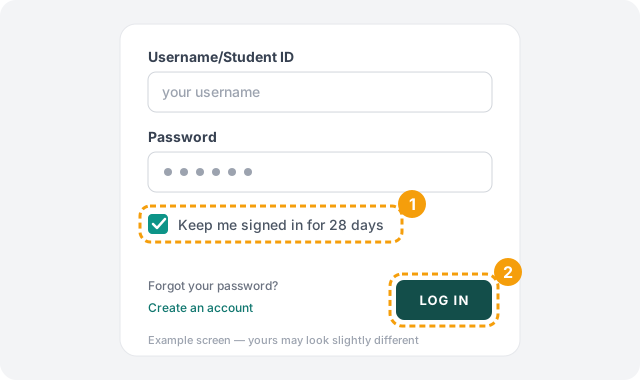
Tired of signing in every time you visit? On the login page, leave Keep me signed in for 28 days ticked and the site will keep you signed in on that device for 28 days. It's ticked automatically.
Steps
-
1. Check that Keep me signed in is ticked
On the login page, enter your username (or Student ID) and password, then make sure Keep me signed in for 28 days, just under the password box, has a tick in it. It should already. If you don't want to be remembered, for example on a shared computer, untick it.
-
2. Click Log in
That's all. Next time you visit from the same browser, you'll already be signed in.
What to expect
- With the box ticked: you stay signed in for 28 days on that browser, even if you close it.
- Unticked: you're signed out after about 2 hours of not using the site.
- It's per device and browser. Tick it on your phone, and again on your computer, if you want it on both. Using a different browser on the same device counts as a different one.
- After 28 days you'll be asked to sign in again. Leave the box ticked when you sign in to start another four weeks.
- Choosing Log out from the menu ends it right away, on that device.
Only on your own devices
Troubleshooting
Still stuck? Contact us and we'll help.